
Quick Answer:
To unpin someone on the updated Snapchat app, press and hold their name in your chat list, tap Chat Settings, then tap Unpin Conversation. That’s it. They stay on your friends list but they just move back to their normal position in your chats.
You pinned someone on Snapchat and now you want to remove it. Maybe you changed your mind, pinned the wrong person, or just want a cleaner chat list.
No matter the reason, unpinning someone only takes about 10 seconds and is very easy to do.
How to Unpin Someone on Snapchat iPhone?
Follow these steps exactly:
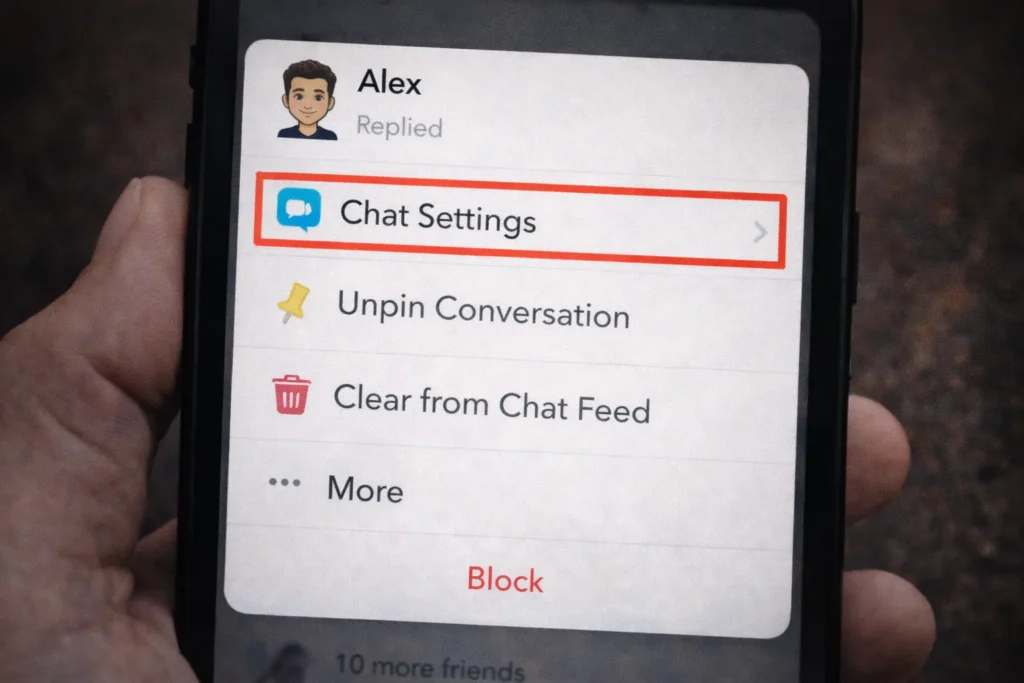
Done. They will immediately drop back to their regular position in your chat list based on your most recent conversations. The change happens instantly.
How to Unpin Someone on Snapchat Android?
The steps are almost identical on Android:
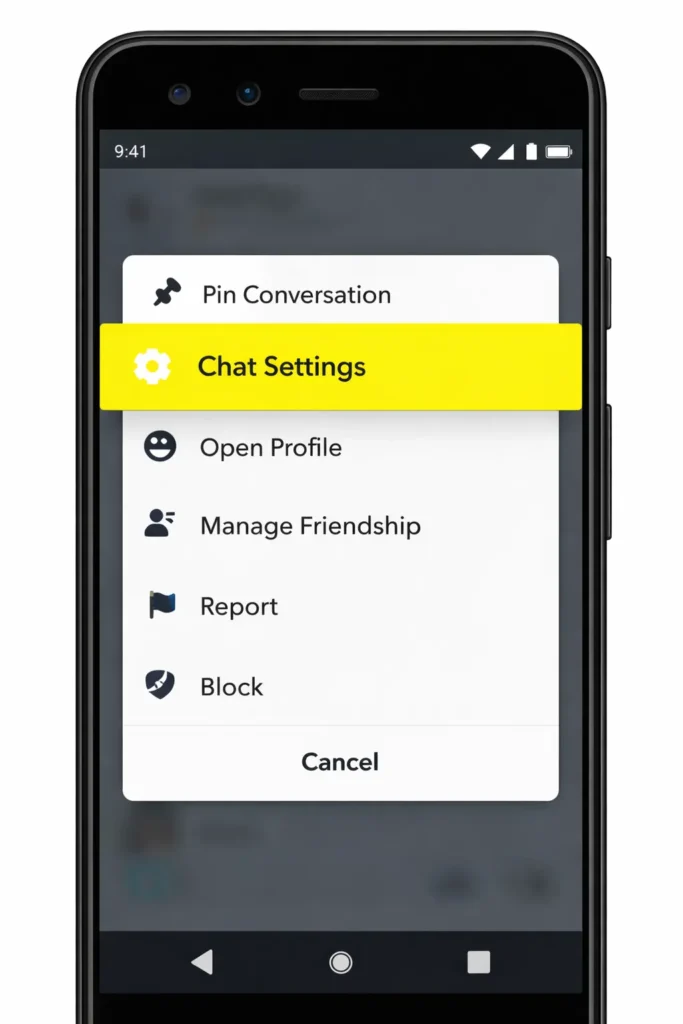
The chat immediately moves back to its regular spot in your list and will now follow normal sorting rules.
How to Unpin Your #1 BFF on Snapchat?
If you are a Snapchat+ subscriber, you can pin one person as your #1 Best Friend (BFF) so their chat always stays at the top of your conversation list. If you want to remove this pin, you can easily unpin them from the chat settings.
Follow these steps:
- Open the Snapchat app on your phone.
- Tap the Chat icon at the bottom of the screen.
- Find the conversation with your #1 BFF.
- Tap and hold the chat until a menu appears.
- Select Pinned as Your #1 BFF to remove the checkmark.
- Tap Done to confirm.
Once you unpin them, the conversation will return to its normal position in your chat list.
Will Someone Know If You Unpin Them on Snapchat?
No, Snapchat does not notify the other person if you unpin their conversation. Unpinning simply removes the chat from the top of your chat list and returns it to its normal position.
The other user will not receive any notification, and they will not be able to see that you removed the pin. Your conversation, snaps, and messages will remain exactly the same.
However, if you pinned them as your #1 BFF using Snapchat+ and then remove it, the change only affects how the chat appears in your own chat list.
Can You Unpin Someone on Snapchat Who Has Unadded You?
Yes, you can still unpin a conversation even if the person has removed you as a friend.
If the chat is still visible in your conversation list, you can simply:
- Open the Chat screen in Snapchat.
- Tap and hold the pinned conversation.
- Select Chat Settings.
- Tap Unpin Conversation.
Once you unpin it, the conversation will move back to its normal position. If the chat disappears completely after the person removes you, then there will be nothing left to unpin.
Can You Unpin Someone on Snapchat Without Snapchat+?
Yes, you can unpin a conversation even without Snapchat+. However, it is important to understand how the feature works.
Snapchat allows users with a Snapchat+ subscription to pin someone as their #1 Best Friend (BFF). This keeps the conversation permanently at the top of the chat list.
If you previously used Snapchat+ to pin someone, you can still remove that pin by tapping and holding the chat and selecting Unpin Conversation.
If you do not have Snapchat+, you may not see the pin feature available to create a new pin, but removing an existing pinned chat usually still works.
What Happens When You Unpin a Conversation?
When you unpin a conversation, the chat drops back to its normal spot in your list. Snapchat automatically sorts chats by most recent activity. So if you talked to this person recently, they will still appear near the top just not locked there permanently.
If you have not messaged them in a while, their chat will move further down your list. That is normal and depends on your recent conversations.
Your streak, friendship status, and best friends list ranking are not affected at all. Pinning and unpinning is purely a visual organisation tool. It does not change anything about your actual friendship data on Snapchat.
Also Read: Do Streaks Affect Snapchat Planet Order? (Truth Explained)
Why Can’t I Unpin Someone on Snapchat?
Sometimes the Unpin option may not appear or may not work correctly. This can happen for several reasons.
1. Your Snapchat App Is Outdated
An older version of the app may cause features to malfunction. Update Snapchat from the App Store or Google Play Store.
2. Snapchat+ Subscription Expired
If the chat was pinned using Snapchat+, the feature might behave differently after the subscription ends.
3. Temporary App Glitch
Occasionally Snapchat experiences temporary bugs. Restarting the app or logging out and back in can often fix the issue.
4. App Cache Problems
Clearing the app cache in Snapchat settings can resolve small performance issues and restore missing features.
If none of these solutions work, try reinstalling the Snapchat app or checking Snapchat’s official support page for updates.
How to Pin Someone on Snapchat If You Want to Re Pin?
Changed your mind? Now yo want to someone and Pinning works exactly the same way as unpinning:
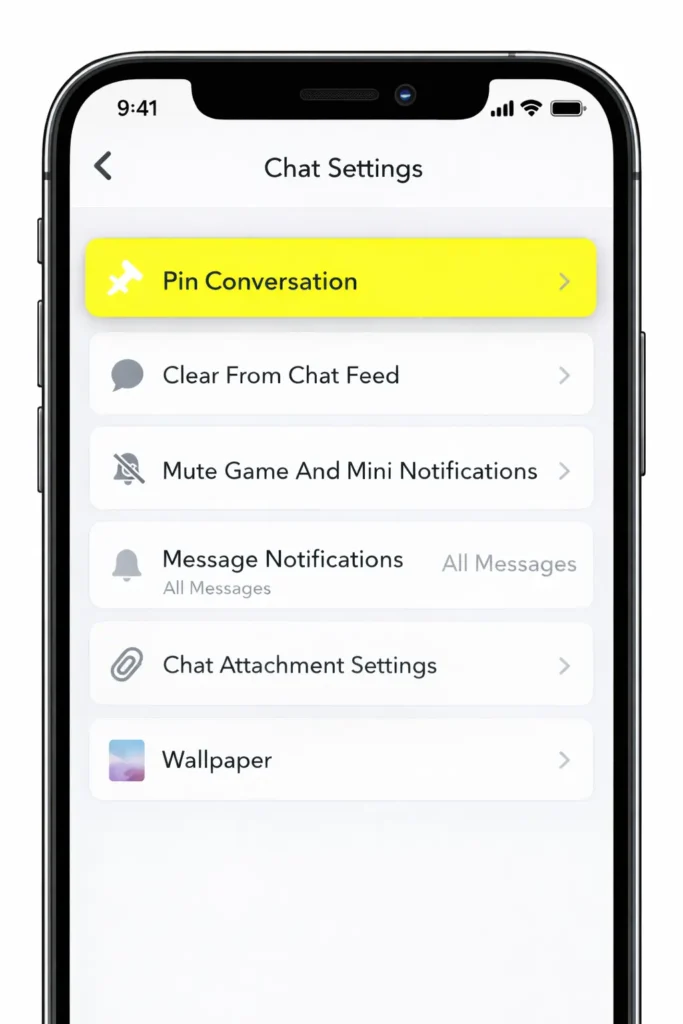
They will jump back to the top of your chat list and stay there until you manually unpin them again.
You can pin up to three conversations at once on Snapchat. If you already have three pinned and try to pin a fourth, Snapchat will ask you to unpin one first before adding another.
Why is someone pinned on my Snapchat when I didn t do it?
If someone is pinned on your Snapchat and you’re sure you didn’t do it, here are the most common reasons in simple terms:
1. You Might Have Pinned Them Accidentally
Sometimes it happens by mistake.
If you press and hold someone’s name and tap Chat Settings, you might have tapped Pin Conversation without realizing it.
It only takes one tap, so accidental pins are very common.
2. Someone Used Your Phone
If a friend, sibling, or partner had access to your phone, they could have pinned the chat. Snapchat does not notify you when someone pins or unpins a conversation.
If you think this might have happened, you can unpin them easily.
3. You Forgot You Did It
A lot of people pin someone during an active conversation and then forget about it later. Pinned chats stay at the top until you manually remove them.
Snapchat does not auto pin people on its own.
4. App Glitch or Sync Issue
Very rarely, Snapchat can glitch after an update or when switching devices. Logging out and back in usually refreshes your chat list.
Important to Know
Snapchat does not automatically pin someone based on streaks, best friends, or activity. Pinning is a manual feature only.
If you do not want them pinned, just:
- Open chat list
- Press and hold their name
- Tap Chat Settings
- Tap Unpin Conversation
Done. It is private and they will not know.
Also Read:How to Turn Off Snapchat Planets (Opt Out Guide)?
Does Pinning Affect Your Snapchat Best Friends List
No. Pinning someone to the top of your chat list does not make them your best friend on Snapchat. Your best friends list is based purely on how often you snap each other not on who you pin.
If you want to understand how the best friends system actually works and how it connects to Snapchat Planets, our guides cover both in detail.
Conclusion
Unpinning someone on Snapchat is quick, simple, and completely private. It only takes a few seconds, and the other person will never know you did it. Pinning and unpinning are just organization tools to keep your chat list the way you like it.
Whether you pinned someone by mistake or just want a cleaner chat screen, you can change it anytime. Nothing about your streaks, best friends list, or friendship status will be affected.
FAQ
Why Is There a Red Pin Next to Someone’s Name on Snapchat?
A red pin next to someone’s name means you pinned that conversation to the top of your chat list.
It does not mean they pinned you.
It does not mean you are their best friend.
It is just a visual reminder that you chose to keep that chat at the top.
Only you can see your pinned chats.
What Does 📌 Mean on Snapchat?
The 📌 emoji on Snapchat means a conversation has been pinned to the top of your chat list. It stays there until you manually remove it.
It does not mean they pinned you.
It does not affect your best friends list.
It does not send any notification.
It is simply a chat organization feature that only you can see.
How to Pin Someone on Snapchat Without Paying?
You do not need Snapchat Plus or any paid subscription to pin someone.
Here’s how to do it:
Step 1 Open Snapchat and go to your chat list.
Step 2 Press and hold the person’s name.
Step 3 Tap Chat Settings.
Step 4 Tap Pin Conversation.
That’s it. The chat will move to the top and stay there until you unpin it.
You can pin up to three conversations at once.
How Do I Know If Someone Pinned Me on Snapchat?
You cannot know.
Snapchat does not tell you if someone pinned you. There is no notification, no symbol, and no way to check.
Pinning is completely private and only affects the other person’s chat list.
When You Pin Someone as Your #1 BFF Does It Notify Them?
No.
Pinning someone does not notify them in any way. Even if you mark them as your #1 BFF by pinning their chat, they will not receive a message or alert.
Also important:
Pinning someone does not actually change your best friends ranking. Best friends are based on how often you snap each other, not who you pin.
Pinning is only for organizing your chat list.